
What is missed-call text-back, and how does it work for a small business?
October 29, 2026
By the VentureTel team · Facts current as of October 2026 · About VentureTel
Short answer: Missed-call text-back automatically sends a text to someone whose call to your business went unanswered, from your business texting number, so they can reply by text instead of waiting for a callback. In VentureTel Messaging it's built in for the VentureTel phone system, and it can also work with another phone provider if that system can send a webhook when a call is missed. Replies land in your shared inbox, where your team picks up the conversation.
Most small businesses miss calls for ordinary reasons: the owner is on a roof, the front desk is helping someone at the counter, or it's lunch. Plenty of callers won't leave a voicemail. They just call the next business on the list. A quick text keeps the conversation going.
What does missed-call text-back look like for the caller?
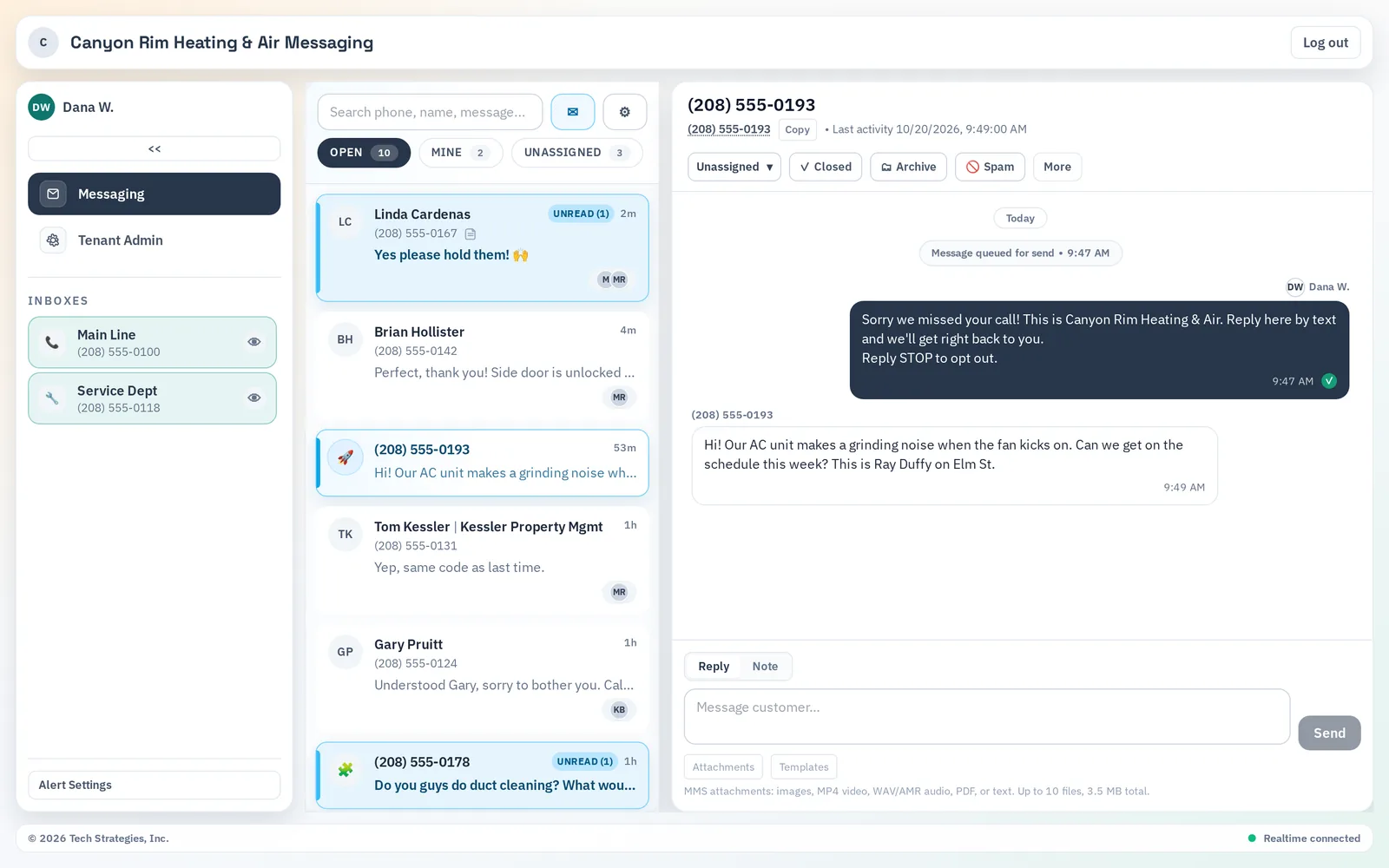
The caller hangs up, and shortly after gets a text from your business number. The default message reads: "Sorry we missed your call! This is [your business name]. Reply here by text and we'll get right back to you." You can rewrite it. If they reply, the reply shows up in the same conversation in your shared texting inbox, where anyone on your team can answer, assign it or leave an internal note. In the screenshot at the top of this post, the automatic text went out at 9:47 AM and the caller's reply arrived at 9:49 AM in the same conversation (sample data from a fictional Twin Falls HVAC company).
What counts as a missed call?
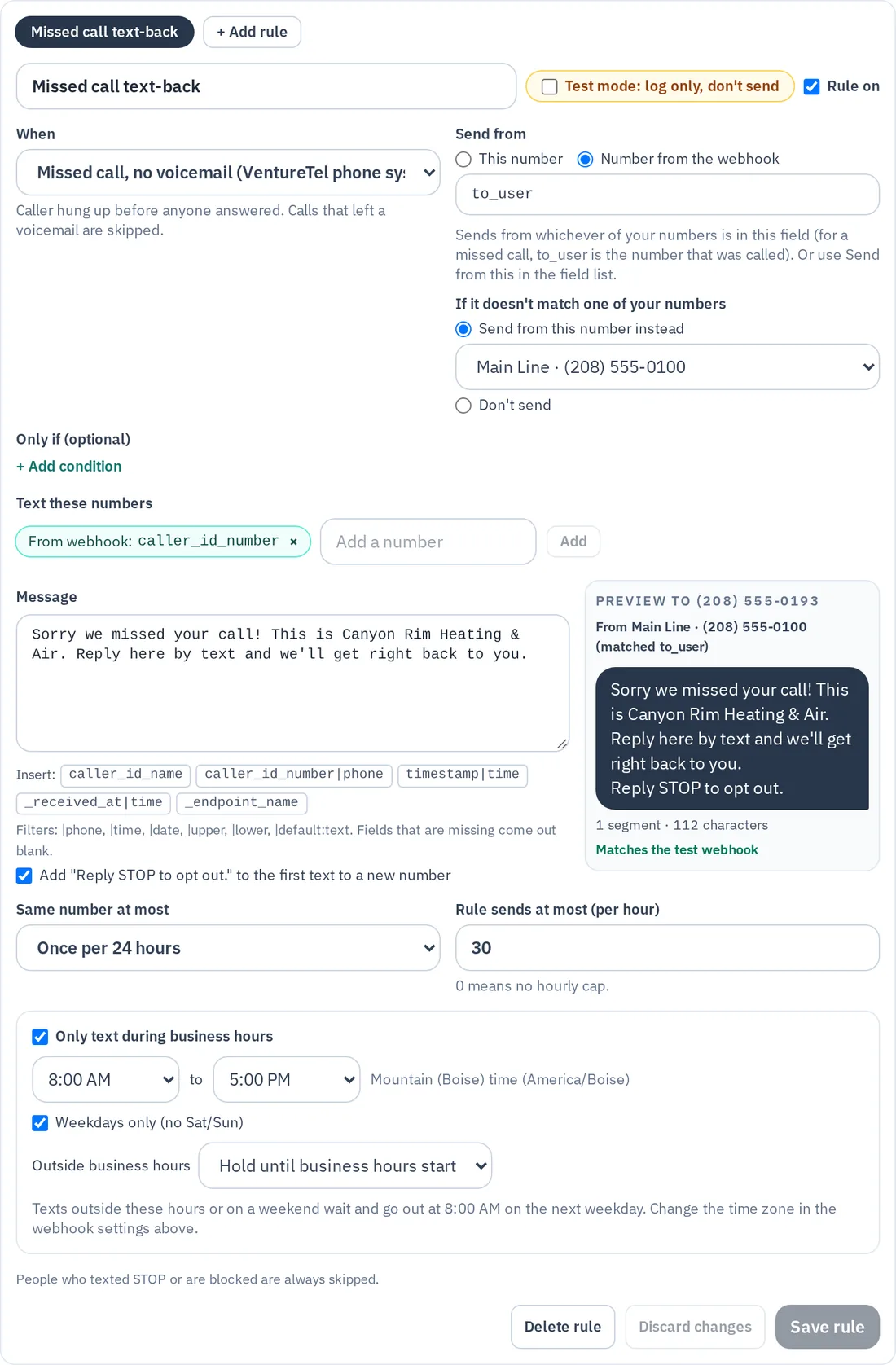
On the VentureTel phone system, the rule uses a setting called "Missed call, no voicemail": the caller hung up before anyone answered. Calls that reach voicemail count as answered, so those callers don't get a text. That way, nobody gets a text after already leaving you a message.
With another phone provider, what counts as missed depends on what that system reports in its webhook. VentureTel helps set up the rule so it reads the caller's number from that webhook.
Who won't get a text?
- Callers with blocked or anonymous caller ID (there's no number to text)
- Calls that reached voicemail, under the default "Missed call, no voicemail" setting
- Numbers that have texted STOP to opt out
- Numbers your team has blocked
- Your own business numbers
How does it keep from bothering people?
Missed-call text-back is opt-in, and each rule has limits you control:
- One text per caller per 24 hours by default, so a customer who calls three times in a morning gets one text. You can change it to no limit, 1 hour, 4 hours or 7 days.
- Hourly and daily caps. A rule sends at most 30 texts an hour by default (you can adjust it), and each account is capped at 1,000 automated texts in any rolling 24 hours.
- Business hours. You can limit texts to business hours. The setting is off by default. When you turn it on, hours default to 8 AM to 5 PM, you can choose weekdays only, and texts from calls outside those hours are held until business hours start. Held texts show as "Scheduled."
- Opt-out wording. The first automated text to a number adds "Reply STOP to opt out."
- Test mode. New rules start in test mode, which logs what would have been sent without texting anyone, until you switch the rule live.
Can I personalize the message?
Yes. Write your own text of up to 640 characters, and use quick inserts for the caller's name, the caller's number, the time of the call and your business name. A preview shows exactly what the caller will see before you save. Keep it short and friendly, say who you are, and invite a reply. For example: "Hi, this is [your business]. Sorry we missed you! Text us here and we'll get you on the schedule."
How do I set up missed-call text-back?
- Get a texting number. You need a VentureTel Messaging account with a business texting number that's registered with the carriers (10DLC). VentureTel files that registration for you during setup, and unregistered numbers can't send texts. Registration usually takes 3 to 5 business days.
- Create the rule. Your admin, or VentureTel, goes to Tenant Admin → Webhooks ("Webhooks to SMS"), creates a webhook with the "VentureTel phone system (missed calls)" preset, and sets up the "Missed call text-back" rule. If you use another phone provider, the webhook is set up for that system instead.
- Connect it once. On the VentureTel phone system, VentureTel connects the webhook to your phone service as a one-time step. With another provider, its system needs to send a webhook to VentureTel Messaging when a call is missed, and we'll help you check that it can.
- Test, then go live. Leave the rule in test mode, make a few test calls, check the log, then switch it live.
Is missed-call text-back worth it for a small business?
If missed calls turn into lost jobs, usually yes. It helps most where people can't always get to the phone: trades and field crews across the Magic Valley, busy front desks in Twin Falls, and Wood River Valley shops and offices in Hailey and Ketchum during the ski and summer rushes. It's no substitute for answering the phone. It's a polite way to keep the conversation alive until you can.
Missed-call text-back is available to every VentureTel Messaging customer. If you'd like your calls handled better in the first place, VentureTel's phone system features include auto attendants and call routing, and our pricing page lists what they cost. Comparing providers? See our comparison pages. For the full feature tour, read What can VentureTel Messaging do for a small business?
Frequently asked questions
Does missed-call text-back only work with VentureTel phone service?
No. It's built in for the VentureTel phone system, and it can also work with another phone provider if that system can send a webhook when a call is missed. Either way, you need a VentureTel Messaging account and a registered business texting number.
Do callers who leave a voicemail get a text?
No. On the VentureTel phone system, the default "Missed call, no voicemail" setting treats calls that reach voicemail as answered, so those callers don't get a text.
Will the same caller get texted over and over?
No. By default each caller gets at most one text per 24 hours. You can change that to no limit, 1 hour, 4 hours or 7 days.
Can I stop texts from going out at night or on weekends?
Yes. You can limit texts to business hours, with an optional weekdays-only setting. Texts from calls outside those hours are held and sent when business hours start.
Where do replies go?
Replies land in your VentureTel Messaging shared inbox, on the web and in the iPhone and iPad app, so anyone on your team with access can answer.
More answers are on our FAQ page and the missed-call text-back section of our texting page.
Want missed calls to turn into conversations?
Text or call us at 208.735.8999, or book a quick review. We'll check your phone setup and get missed-call text-back running in test mode.